Monday, November 13, 2017

Discovery Education's Spotlight on Strategies

Looking for a way to spice up your vocabulary lessons?  Want a fun way to teach prediction skills?  Discovery Education (formerly known as United Streaming) has complied a plethora of fun teaching strategies that use digital media.   If your looking for some new activities and strategies this is a great place to start!


RTSD 26 staff has access to a Discovery Education account. DE is a video database which also also includes lesson plans and interactive teaching and learning tools. If you need to create an account, you can find the directions on the RTSD 26 Subscription Websites doc.

Wednesday, November 8, 2017

New Features in Kahoot!

Kahoot! has added some great new features since my first post about it in 2015!

1.  Jumble
In this new game format students don't need to just come up with the correct answer, they need to come up wit the correct order/sequence of 4 choices.


2.  Team Play
KAhoot! added a Team mode feature so students can compete as a team using 1 device.  (Not available for a Jumble yet.)


3.  Game Options
Kahoot! has added some great game settings to help you customize your students' experience.


4.  Ghost Mode
After the end of a normal quiz, students can choose to play the game again in Ghost Mode.  In this mode a "ghost" of the player plays along side the player.  The "ghost" answers the question exactly the same way the student did on the first game.  At the end, students can compare their results with their first attempt and see if/how much progress they made.  (Not available for a Jumble yet.)

5.  Assign a Kahoot! as homework!
  1. Open the Kahoot! you want, or create one as usual.
  2. Click on the Challenge button and follow the instructions to set up a challenge. Choose how long you want it to be live.
  3. Copy the challenge link, and share with your students – via email, google classroom, your website, etc...

Remember there are 4 different kinds of Kahoots - Quiz, Discussion, Survey and Jumble.  Need a quick reminder about each type?  Read What are the different kahoot types for?

Wednesday, October 25, 2017

CheckMark


A new Chrome extension will make using comments on a Google doc quicker! With CheckMark installed, a small keyboard with abbreviations for common errors like capitalization and punctuation pops up every time you highlight text on a Google doc.
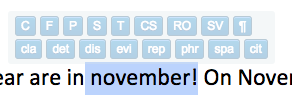


Just click the desired abbreviation and a comment is created instructing your students what editing suggestion you are making.
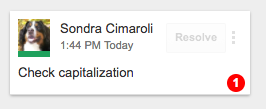


Quick and easy!


C = Check capitalization
F = Check for fragment
P = Check punctuation
S = Check spelling
T = Tense
CS = Check for comma splice
RO = Check for run-on sentence
SV = Subject/Verb agreement
¶ = New paragraph needed
cla = Clarify your idea/meaning
det = Detail needed
dis = Discussion needed
evi = Evidence needed
rep = Repetitive
phr = Rephrase
spa = Spacing
​cit = Check Citation

There are plans to increase the extensions functionality in the future, but it is pretty sweet right now!


Monday, October 16, 2017

RAD Lands in School Virtual Field Trip

Discovery Education and Chipotle have partnered up to provide teachers with classroom resources for teaching about eating healthy. Visit RAD Lands in School to check out these resources.

On Wednesday, November 8, 2017 from 12:00 PM to 12:30 PM you can take you students on a LIVE virtual field trip to learn how easy it is to not only eat healthy, but how to have fun doing it!

The field trip is free! Registration is required. Then on 11/8 you can project the field trip in your room, sit back and enjoy the journey. Easiest field trip ever!

Friday, October 6, 2017

BrainPop and BrainPop Jr. Lesson Ideas


https://educators.brainpop.com/

BrainPop has lesson plans and ideas for many of the videos.


Some lessons include ideas to Smash other programs like Google Earth or Skitch with a BrainPop video!

Other lesson include some pretty cool Extension Activities. 

Thursday, September 28, 2017

Eleanor Amplified!


The Radio Adventures of Eleanor Amplified podcast for kids 8-12 with entertaining, fictional stories about a world-famous radio reporter, Eleanor Amplified.  Designed to get children interested in journalism, spark conversations and make smart choices the episodes are 10-15 minutes of action packed adventures!

Great for a listening station or as a whole group!

Tuesday, September 26, 2017

MoxieReader on SALE!!

Tired of paper reading logs?
Looking for a new way to motivate your class to read?
Want to help students find the right book for them?

Check out MoxieReader!  It is on sale through September...  $19.99 for the year (regular price $63)


What is MoxieReader from MoxieReader on Vimeo.

Track, motivate and personalize what your students are reading at home and in the classroom!