Tuesday, January 15, 2019

Draw.io

draw.io is free online diagram software for making flowcharts, venn diagrams, timelines and diagrams that save in your Google Drive!  The charts can be exported in numerous formats including .jpeg and .pdf as well as embedded in websites!


Tuesday, January 8, 2019

MIT Blossoms

The Massachusetts Institute of Technology developed BLOSSOMS (Blended Learning Open Source Science or Math Studies).  On Blossoms you can find free math and science video segments that include a teacher’s guide, downloadable handouts, and a list of additional online resources relevant to the topic.  The lessons are designed for High School students, but the videos are interesting!

https://blossoms.mit.edu/

Topics Include:

Thursday, November 15, 2018

Friday, November 2, 2018

Quick and Easy Video with your Chromebook's Camera App!

The camera app on our Chromebooks has been updated with  a webcam feature!  The videos and pictures you take are saved on your Chromebook in Files>downloads.  They can be easily moved to your Google Drive and then shared with others, used in a WeVideo project or uploaded to Schoology!

To find your camera app or your downloads use the launcher button on the bottom left of your screen.


Choose whether you want to take a photograph (white circle) or a video (video camera button).


VIew your photos or videos in the gallery or in your downloads!

OR


Friday, October 26, 2018

Schoology- Duplicate an entire course

If you teach a new class each quarter you may want to get all your materials into your new class in one fell swoop!

Go to the class that just ended and click the options button at the top of the screen.


When you choose Save Course to Resource, Schoology will drop a folder packed with all your materials into your Resources.

Then you can "copy to course" that folder to your new class!

It is imported still packed in the folder, so you will have to unpack it!

Monday, October 15, 2018

Adobe Spark Student Log in

Adobe Spark now has an education version for children under 13.  To Access it, have the students click Log in and choose the "Log in with school account option.... NOT the Continue with Google.

They will have to put their email in (possibly two times) and password.   

Spark is an awesome, quick way to create posters and videos.  Click HERE for 7 quick steps to create a movie and some classroom ideas for using Spark.

Monday, September 24, 2018

Flippity Random Name Generator

Creating your custom Random Name Generator is easy with Flippity!  

Once created, it just takes a click of a button to put your students into groups, teams, lines or even generate a random seating chart!

Sample:  https://www.flippity.net/rp.asp?k=19p4btzklHegRzF1gnoGl4bTziVEl12SO-oLyOJ0K8RU


1.  Make a copy of the template
2.  Replace the student names on the spreadsheet with your students' names
3.  Click File>Publish to the Web>Publish
4. Click the Get the Link Here, click the link and bookmark your random name generator!

Tuesday, August 21, 2018

Schoology- Getting Help

Now that RTSD 26 has adopted Schoology as our Learning Management System, here are a few resources you may find handy.

Schoology's Help Center can be accessed through the Support link at the bottom of your Schoology dashboard.

Course Materials Cheat Sheet

Assignments

CC Aligned Rubrics

Custom Rubrics

Discussions

Linking Sections

Assessments (Don't use Test/Quiz, it is being phased out.)


Friday, July 20, 2018

You CAN change your Twitter handle!

Have you changed grade levels, positions or moved to a new school and your Twitter handle is out of date?  No worries!  You can change your twitter handle!  Log into Twitter, navigate to the Privacy and Settings page and simply type in a new user name!  Don't forget to scroll down to the bottom of the page and click the Save Changes button when your done.


Friday, March 23, 2018

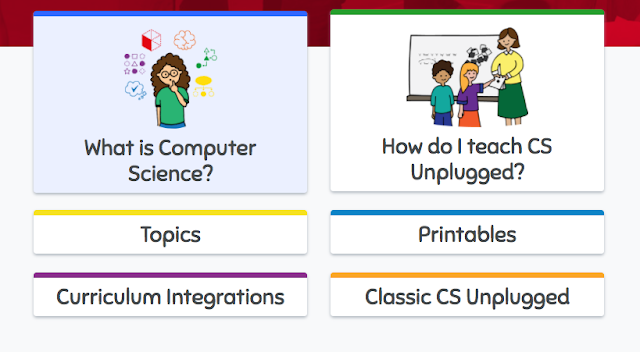
CS Unplugged


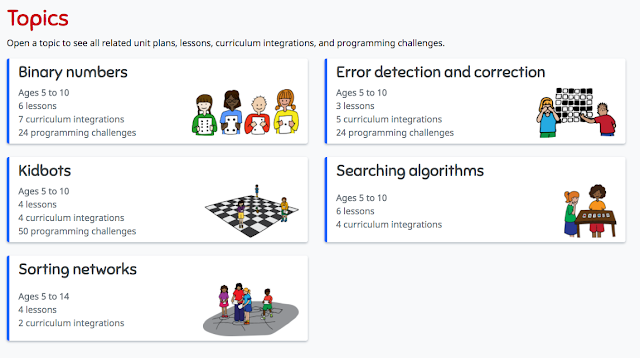
CS Unplugged lets you teach computer science skills without a computer!  Teachers don't need to know how to program or code to use these hands-on, kinesthetic lessons!  Some lessons have videos that show you exactly how the lessons can be implemented.  These free lessons and resources teach important critical thinking, collaboration and creativity through engaging games and puzzles.


The topics have lessons that easily integrate CS skills into writing, reading math, science, art, music, and drama.


Friday, March 2, 2018

ClassroomScreen

Classroomscreen.com  


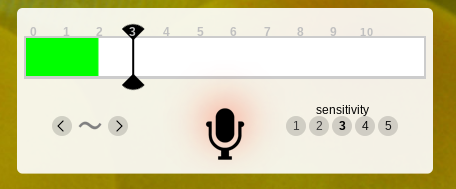
Leave this website up all day and use it to quickly use and display classroom productivity tools like timers, clocks, drawing pages, noise level monitors, dice and post its!  Yo can even create and display QR codes right on the page by just pasting in a URL!!!!


Super easy and fun!!!


Tuesday, February 20, 2018

Life of a Can

Novelis and Discovery Education created a new elementary recycling education program that teachers about recycling through lessons and activities focusing on the "Life of a Can."

Resources include an interactive challenge, lesson plans for 3-5th graders, and activities for families.  There is even a tool kit to help students create a school-wide recycling program!


Friday, February 2, 2018

Flipgrid


Create a wall/page where students can share ideas and respond to questions using quick, short videos!  It's easy, fun and has more potential classroom uses that I can count... like a digital "I Wonder" wall, exit slips, essential questions, your class newsletter......

Here's my first Flipgrid... 


Flipgrid's Library of Ideas (Topics of Discovery)

Even more ways to Use Flipgrid

Downloadable instructions for teachers and students!

Getting Started Video (2 minutes)


Quick Walkthrough Video from Flipgrid on Vimeo.

Tuesday, January 30, 2018

Introducing How Computers Work


Code.org produced a series of short videos to help students understand computer science concepts better!

Monday, January 22, 2018

Instructional Learning Strategies SIPD’s # RTSD26SIPD Learning how @olgaadams19 made reading instruction better with novels! @wagnernancy https://t.co/6PD7seKiJt


from Twitter https://twitter.com/igitteacher

January 22, 2018 at 08:28AM
via IFTTT

Thursday, January 18, 2018

Another Exciting Feature of Kahoot!

Kahoot has decided to help us out and create a library of free, curriculum-aligned games designed for classrooms!

Rest assured that the content of these Kahoots are factual, reliable and appropriate! You can also duplicate and edit these Kahoots to customize them for your specific needs!

To find Kahoot's official Kahoots...

First click


Then either click on the See Collection images 


or look for Kahoots made by one of these accounts.


Previous posts about Kahoot

New Features in Kahoot!  11/28/17

Wednesday, January 17, 2018

Adobe Spark!

Adobe Spark is a graphic design app that enables you to create 3 types of projects: a post, a web story or a video.

Classroom Uses
  • Sight word proficiency
  • Narrative prompts /Story starters/Creative storytelling
  • Book reports
  • An alternative to written assignments 
  • Research/Genius Hour reports
  • Field-trip reports/ 
  • Vacation Journals
  • Student portfolios
  • Classroom newsletters 


Here are 7 simple steps to create your own a Spark video!


Create an account and log in to https://spark.adobe.com


Tuesday, December 5, 2017

Rotating Pictures

Rotate Pictures in Bulk
The simplest  way to rotate a bunch of pictures at once is to use your Windows laptop.  Once the pictures are in a folder on your laptop, you can select all the pictures you want to rotate, right click on one of them and choose the rotate left or rotate right option.  


Then, if needed, the whole folder can be uploaded to your Google Drive.


Rotate One Picture
If you have only one picture to rotate, or you want you students to rotate a picture, your best bet is PixlrExpress (https://pixlr.com/express/). You can use a Chromebook or your Windows computer.


Click Browse and choose a picture from your computer or your Google Drive
Click Adjustments>Rotate
When you are finished, click Apply

Then Save your picture to your computer or your Drive

PS.. I LOVE PixlrExpress for basic photo editing and especially making collages.  It is quick and simple to use.  You should check it out!  


Monday, November 13, 2017

Discovery Education's Spotlight on Strategies

Looking for a way to spice up your vocabulary lessons?  Want a fun way to teach prediction skills?  Discovery Education (formerly known as United Streaming) has complied a plethora of fun teaching strategies that use digital media.   If your looking for some new activities and strategies this is a great place to start!


RTSD 26 staff has access to a Discovery Education account. DE is a video database which also also includes lesson plans and interactive teaching and learning tools. If you need to create an account, you can find the directions on the RTSD 26 Subscription Websites doc.